- The AI+
- Posts
- 🧾 How GPT Turns Raw Exports Into FP&A-Ready Insights (In Minutes)
🧾 How GPT Turns Raw Exports Into FP&A-Ready Insights (In Minutes)
The easiest way to transform raw data into CFO-ready insights using GPT.
☕ Morning! Welcome back to The AI+ — your weekly shortcut to doing smarter finance work with less grunt work.
You know that mountain of CSV exports sitting on your desktop — the one you keep meaning to clean, organize, and analyze? What if you could hand it over to GPT, hit “run,” and get back a set of polished KPIs, a quick summary, and even chart suggestions — all before your second coffee?
FP&A analysts dreading variance commentary: I trained GPT to write CFO-ready explanations in 90 seconds — and my VP signed off without edits.”
This week, we show you exactly how to turn raw data dumps into executive-ready insights. No heavy coding. No complicated ETL tools. Just your spreadsheet, GPT, and a little magic. Inside:
⚡ 1 AI Hack: The “Raw CSV → Clean Data → Insights Summary” GPT Workflow
🛠️ 3 Free AI Tools you can plug right away
🧠 News Byte: Why AI is becoming the go-to assistant for modern FP&A
🌐 What’s Happening: 3 fresh reads on data-cleaning and AI in finance
😂 Meme of the Week (insert laugh)
And more…
Let’s dive in — because “data cleanup” doesn’t have to mean another all-nighter. 👇
⚡ AI Hack: From Raw Exports to Ready-to-Use FP&A Insights
🧠 The Problem:
If you’re like most FP&A analysts, you often receive raw data exports — P&L lines, sales transactions, GL exports, export dumps from ERPs or CRMs — in CSV form. Before you can analyze, comment, or visualize: you have to:
Clean the data (remove duplicates, fix formatting)
Normalize categories (e.g. “Marketing Exp” vs “Mktg Expenses”)
Calculate KPIs or key metrics
Detect trends / outliers / anomalies
Write summary commentary + possible action items
Doing that manually? Hours of work before you even start your analysis.
🧰 What You’ll Need:
A CSV or Excel export (sales, GL, P&L, raw transactions, etc.)
ChatGPT (or any GPT with data-upload capability)
Google Sheets or Excel (to download / export CSV)
Optionally: AI-powered spreadsheet tools (see below)
🔁 Step-by-Step:
✅ Step 1:
Export your raw data
From your ERP/CRM/financial system, pull the raw export as CSV. Keep the column headers clear (e.g. Date, Account, Amount, Category, Region, etc.).
Here’s an example of a raw CSV export you might upload:
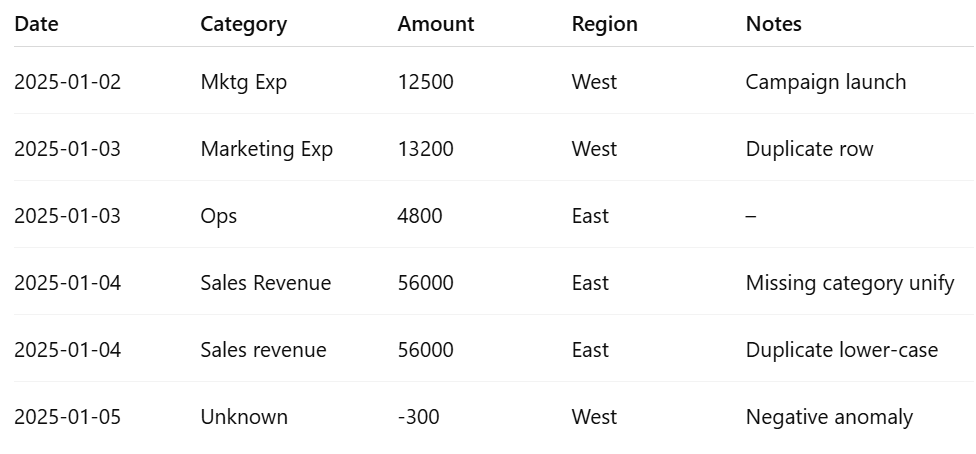
Just download this kind of table as a CSV and drag it into ChatGPT.
✅ Step 2: Upload into ChatGPT (or Finance AI Assistant).
Open ChatGPT → start a new chat → upload the CSV file as input.
It should say:
File uploaded: data.csv
✅ Step 3:
Use a prompt like this:
“Here is a raw data export from our finance system. Please:
Clean the data:
remove duplicates,
standardize category labels,
fix casing,
handle anomalies (flag negative or outlier values),
identify missing values or inconsistencies.
Calculate key metrics:
total revenue
total expense
profit margin
MoM changes (if applicable)
top 5 categories by spend
Provide an executive-ready summary:
3–5 bullet points
1 short paragraph of recommended next steps
Suggest the best chart types to visualize trends. Return:
cleaned table (CSV format)
summary
chart list”
✅ Step 4:
Review output
Here’s what GPT will generate:

Metrics (sample)
Total Revenue: $56,000
Total Expense: $17,000
Net Profit: $39,000
Profit Margin: 69.6%
Anomalies Detected: 1
Duplicated Entries Removed: 2
Executive Summary (sample)
Revenue for the period totaled $56K, driven primarily by East region performance. Marketing costs were modest at $12.5K, and Ops spend remained stable at $4.8K. A negative amount flagged under “Unknown” requires review. Overall profitability remained strong with a 69.6% margin. Recommend fixing category mappings and validating the anomaly before rolling into forecast.
Suggested Visuals
Time-series revenue vs expense
Stacked bar for category spend
Scatterplot to highlight anomalies
Region-level breakdown pie chart
✅ Step 5: Optional Follow-Up Prompts
Optional Export back to Excel / Sheets
A) “Export Cleaned Data Back to Excel” Prompt
Paste this into ChatGPT after reviewing the cleaned table:
Please export the cleaned dataset as a downloadable CSV. Ensure column headers remain consistent and formatting is preserved.
GPT will return a downloadable CSV you can drop into Excel or Sheets.
B) Give Me a Dashboard Blueprint” Prompt
Create a dashboard layout using this cleaned dataset. Include:
- 4 chart recommendations
- KPI section layout
- Filters to include
- A short narrative header I can paste into PowerPoint
C) Explain It to My Manager” Prompt
Rewrite the summary in a tone for VP/CFO review:
- concise bullets
- risks + mitigation
- a one-paragraph insight narrative
✅ Step 6:
Deliver or export as PDF/report
Now you have a near-analysis-ready dataset, commentary, and chart plan — ready for your manager, presentation, or deeper dive.
🔥 Outcome Test:
Run the process on a small sample first. You’ll likely get:
A cleaned dataset — no duplicates, standardized categories
Calculated KPIs & metrics (margin, growth, anomalies, etc.)
A crisp, executive-ready summary of findings + next steps
Suggested visuals to illustrate trends
🔥 Why It’s Awesome:
Cut your data-prep time from hours to minutes. Get clean, analysis-ready data and a narrative before your lunch break.
🛠️ 3 Free AI Tools
1. ChatGPT (Structured Prompt + File Upload)
What it is: Upload raw CSV / Excel exports, ask for cleaning + insights
Why it helps: Works with Excel exports, easy to prompt — perfect “data janitor + analyst” combo
2. GPTExcel
What it is: AI-powered formula & data-cleaning + SQL/regex generation for Excel
Why it helps: Great if you want to automate cleanups or build repeatable data-prep scripts
3. Rows AI
What it is: Spreadsheet-native AI: clean data, run analysis, generate summaries right inside sheet
Why it helps: Useful if you prefer to stay inside Sheets/Excel rather than switch between tools
🧠 News Byte: AI — The New Data Janitor & Finance Sidekick
AI is no longer just an experimental add-on for finance teams — it’s becoming a core assistant. A new 2025 research report from EY shows how AI is reshaping the role of FP&A, not by eliminating it — but by upgrading it. Tasks like data consolidation, cleaning, and initial analysis are increasingly handled by AI, allowing analysts to elevate to strategic, insight-driving roles.
What does this mean for you? If you’re still spending your Sunday evenings manually wrangling exports and cleaning data, you’re doing the work of a “data janitor.” With GPT-powered workflows, that grunt work disappears — and you get to focus on what really matters: insights, narrative, strategy.
The shift is already underway: a 2025 survey found that 79% of FP&A teams now use some form of AI in their workflows.
If you treat AI as a copilot (not a threat), you’re positioned to become the go-to strategic analyst in your organization — not the person crunching numbers until midnight.

🌐 What’s Happening
Variance analysis isn’t just about the numbers anymore—it’s about automation, speed and storytelling. Here are three standout reads that show how teams are using AI to change finance workflows.
1. 4 Ways Finance Can Use AI to Eliminate Tedious Data Work
Shows real FP&A use-cases — from cleaning data and reconciling records to automated reporting and anomaly detection. Offers tangible ideas that map directly to what we just built with GPT.
2. Top 10 AI Tools for Excel Data Analysis (Nov 2025)
A roundup of the latest AI tools that help with data-cleaning, trend detection, chart suggestions, and predictive analytics — ideal for anyone working with high-volume spreadsheet exports.
Summary: AI is enabling continuous planning, integrated forecasting and intelligent commentary in FP&A teams.
3. AI in Financial Planning and Analysis (FP&A)
broader view of how AI is transforming FP&A roles: data consolidation, faster reporting, better insights, and shifting the team’s value-add from output to analysis. Great context if you want to push this to leadership.
Summary: AI will automate the standard variance commentary and let analysts focus on business partnering and insight.
Meme Corner 😂

✅ That’s a wrap on this week’s The AI+.
You just saw: a full, replicable GPT workflow to convert raw data exports into clean, insight-ready FP&A deliverables ✨
Three free tools you can try today — no complicated setup required
Solid evidence that AI is already transforming FP&A workloads — and if you’re not using it, you’re falling behind
Keep the data flowing and the insights coming.
Until next time,
Shirley, Chief Nerd at The AI+
P.S. Steal the full Data-Export → Insight Cheatsheet (with prompt, template, and bonus workflow tips).
12 FP&A-tested ChatGPT prompts that cut forecast cycles from days to hours. Used by analysts at $500M+ companies.
👉 Download free → https://theaiplus.beehiiv.com/c/cheatsheet-forecasting
Reply